VMPal is described as “Virtual Machines built for Apple silicon and AI agents”.
Straight from Apple, installed in minutes, with Metal on your Mac’s GPU. VMPal Tools add the clipboard and drag & drop. On macOS 27, setup takes no clicks.
I’ve used it briefly to setup a new MacOS install, and it worked great. I haven’t tried it yet, but I have dreams of using VMPal to automatically setup a new install for me, run some tests, and tearing everything down.
The angle the VMPal developers are taking, where agents can drive the install and usage, is smart. One of the problems that many folks are running into when using agents to drive their Mac* are warnings appearing which agent’s can’t “see”. If MacOS is installed in a VM, and all pixels are drawn to a buffer that an outside agent can see and act on, then that problem just goes away.
* Personally, I have not done this. I see the appeal though.

October 16, 2026
A podcast named Designed in California:
Expertly-told stories about the 50-year history of Apple and the world it created, from Jason Snell and Myke Hurley. We cover the entire range of the last half-century, from Apple’s earliest days in a garage, to the rise of the Mac, to the return of Steve Jobs and the creation of some of Apple’s most iconic products.
I jumped on the Kickstarter when it was originally announced, and the other day I started listening to the first few episodes. And I didn’t stop. Well, I did stop because I ran out of episodes, but that’s a me problem I guess. I should have paced myself.
It’s really good. I have a lot of memories of the events which were covered, so it was really fun to hear them told again and to even hear some new information.
When Apple bought NeXT, myself and my roommates were constantly looking for rumors on how that was all going. My roommate Tim was a huge NeXT fan, and even bought a NeXTcube at some point. I distinctly also remember seeing a PDF of Apple engineers celebrating the first successful boot of OpenStep on PowerPC; I wish I knew the source or the date for that. The internet moved a lot slower back then. I’m super happy Snell and Hurley are making this podcast, it’s really a gift to the community.
October 12, 2026
Acorn 8.7 is out, and it’s got some fun new features, many of which have been requested for years.
Two new brush types: Repair and “Synth Fill”, which let you brush away unwanted objects in your photos. The Repair tool uses Metal kernels to quickly look around the area that needs to be touched up, and fills in using similar pixels to what it finds. Repair is kind of like a super clone tool. The Synth Fill tool uses ML to do a deeper dive into the image to figure out what it can synthetically create to fill in. This is also known as inpainting, or generative fill, and uses a downloaded model to work. (I like the approach of having the ML models downloaded as needed, since it can keep Acorn’s file size small, make updates quicker, and if you aren’t a fan of these things, the models never have to sit on your computer.)
You can now resize multiple selected bitmap layers at once, even with a selection. And speaking of selections, there’s a new “Expand Selection” option in the Selection palette which lets you non-destructively expand the current selection by a set number of pixels. (Finally.)
New filters: Temperature and Tint, Edge Stroke, and a High Pass filter.
SVG improvements include new options when opening an SVG file, as well as writing out bitmap layers when exporting (finally).
Photoshop image import also has improvements: Support for reading 16-bit-per-channel PSD files, grayscale PSDs, and the Color Overlay layer effect. If you have a PSD that doesn’t open up in Acorn correctly, please let us know!
Also new, which I apparently completely forgot to include in the release notes, is an updated non-Liquid Glass layout. While the edge-to-edge layout looks nice and contemporary, I feel like it doesn’t work best for an image editor. It can be overly distracting and gives the feeling of covering up your images. So I’ve brought back the standard canvas layout, where the tools aren’t floating over the canvas, and the toolbar is plainly a toolbar. The edge-to-edge UI is still there as an option for those of you who prefer it.
There are more features, improvements, and of course bug fixes. Check out the full release notes for all the details.
September 14, 2026
Happy MacOS Release day for those who celebrate.
MacOS 27 ”Golden Gate” is being released today, and the latest versions of Acorn (v8.6.3) and Retrobatch (v2.4.1) are fully supported.
Of course if you run into any issues, let us know right away (I like to think we’re super responsive at getting fixes out).
Later this fall I‘ll be releasing the next feature update to Acorn, which will likely have some UI tweaks for Golden Gate, among other things. I don’t think MacOS has quite settled on what the look and feel should be for the next couple of years, but I’m hoping the community will figure out a general design language soon.
Christine Lemmer-Webber: But where does taste come from?.
Yes, it’s another post about how taste is the only differentiator. But, I liked this one, especially the ending:
I don't know any solution to that, but I guess: keep making weird art. It's the best way to stay interesting, and the best way to add taste to this increasingly averaged world.
It’s a quick good read.
Years ago, I wrote a little bit about an artist named Jeremy Mann and how inspiring I found him and his work (visit the post to read my gushing).
I mentioned Mann to a friend today and started rewatching his video Behind the Dark Room, and got sucked in of course. It's required watching for anyone who didn't watch it the first time around. Yes this is homework.
I'm also incredibly happy to see that an archive of his newsletters is now online.
I want to make things like Jeremy Mann does someday.
Nate (no last name that I can find) - Don't use your phone while you poop:
When we stop feeding our brains constant input, they can finally attend to the housekeeping of the mind. In this state they'll consolidate memories, connect ideas, process emotions, and most likely generate high-scoring Scrabble words.
If our brains were pizza chefs, they would take down those spinning pies you've been juggling and slide them neatly into the brick oven to bake. Then, and only then, could you take new orders from the endless line of customers at the door.
I of course had to link to this because of the analogy used.
But yea, give yourself some time away from the screen whenever you can. And while you’re at it, maybe take a walk or drive without listening to podcasts for a bit.
June 26, 2026
Acorn 8.6 is out!
The big new things are:
- A new brushing engine that has been rewritten using Metal shaders. It includes an option for “velocity thinning”, where the faster you draw your brush strokes, the thinner the lines.
- A new
acorn shell tool that you can use to send JavaScript to Acorn, as well as start an MCP server. So if you’ve got a favorite LLM you like to use, you can now use it to drive Acorn. The JavaScript section of the release notes are a good read if you’re interested in that. In addition:
- The JS API has also been updated with examples for most calls.
- The shell tool has a
-jsio argument which lets you do things like:
echo "acorn.takeLayeredScreenshot();" | acorn -jsio
- Big ML models (used for Select Subject and Super Resolution Scaling) are now downloaded on demand. If AI isn’t your thing, they won’t take up any space on your Mac. If you do use those features, the models are downloaded once and cached, and future Acorn updates are faster because those models no longer ship with the app.
There’s more of course, including bug fixes and QOL things, which are covered in the release notes.
Details on the new brushing engine (kind of nerdy)
The new brush engine is really exciting for me, as it’s something I’ve been wanting to do for years now, and I think I really got it right this time around.
There are two main components to this new brush engine (which I call ”FMVelocityBrush”).
The first collects all the input points for brush strokes and smooths them before painting. If you’re using a mouse for brushing, then sometimes lines get a little jagged. Or maybe you’re moving the cursor faster than MacOS can deliver input, so Acorn has to smooth out those lines. Acorn has done this for decades at this point - that’s not new.
What’s new is the use of a low-pass IIR (Infinite Impulse Response) filter, which smooths the input even further. Once I had that working, the brush simply felt right in a way it never had before. That made me very happy.
The second component is the use of Metal shaders for painting. Previously, Acorn used a handful of Core Image filters to lay down pixels. Even though Core Image itself uses Metal, it was never quite fast enough for this particular workload. Core Image is incredibly fast for most tasks, but I was effectively abusing it by sending it a huge number of tiny rendering requests. Large brushes performed well, while small brushes could be painfully slow.
So now the engine paints the brush strokes using Metal shaders directly, where I have more fine-grained control over what is going on. I even have the brush strokes blend using a custom compositor, so instead of dark fringes when you paint red over green, you get nice perceptual blending. It’s pretty great.
In the past I’ve used straight Core Graphics APIs or simple Core Image filters to paint. I even spent way too much time creating a multi-threaded engine that would take input on the main thread and perform the calculations and drawing on a background thread to speed things up. In a way I’m proud of that one but it never really got me to where I wanted things.
But Acorn’s brush drawing now feels really good in a way it never has before, and I’m looking forward to building on it in the future. The smudge and clone tools also use this new engine - and with the speedup in painting, using the smudge tool is actually pretty fun.
If you’ve been frustrated with Acorn's brushing in the past, give it another try. And let me know if anything feels off with it.
Paul Kafasis on the Rogue Amoeba Blog: Free The Icons:
With last year’s release of MacOS 26 (Tahoe), Apple made a mess of app icons. In the first betas of MacOS 27 (Golden Gate), however, there are signs of a turnaround. We’re urging Apple to continue making improvements, by restoring the ability for MacOS app icons to have distinct shapes.
I wholeheartedly agree. I get why Apple did it, but I think it's completely wrong for the Mac.
Artem Loenko: Native all the way, until you need text:
I did everything people say you should do. Native all the way. I know the platform. I know the options. I know SwiftUI, AppKit, TextKit, WebKit.
But I still cannot make a simple thing work properly: a chat with Markdown & the ability to select a whole message.
And suddenly it becomes much clearer why most new chat-heavy apps that depend on one of the most important interface patterns of this era – chat, long-form rich text, flexible typography – are web-based in one way or another.
In the beginning (aka, Mac OS X 10.2 in 2002), there was nothing better than NSTextView.
It evolved, and we eventually got TextKit 2. But something's off about it, and I can't quite explain what or why.
Update: Matt Sephton left a comment on HN about Loenko‘s post:
I recently launched a text editor for iOS that uses TextKit 2 and is highly performant with files of 5,000 lines (I tested with Moby Dick from Project Gutenberg). I made it between Aug 2025 and Apr 2026, development is ongoing.
Every keystroke is restyled in under 8ms: no debouncing, no delayed rendering. 20 rapid keystrokes are processed in 150ms with full restyling after each one.
April 29, 2026
I was asked today how to make square crops in Acorn while keeping the aspect ratio when you resize the square. It’s pretty easy to do if you know a couple of keyboard shortcuts.
First, press the 'c' and 's' keys in quick oder (this is short for “crop square”). This will automatically add a square crop to your image. (Another good one I use all the time is pressing the 'c' key twice, which will add a general crop to your canvas).
You can then resize the crop bounds in the canvas with the shift key held down, and it will remember the aspect ratio as you resize.
There’s also a “Crop Square” Command Bar action (⌘⇧O), which will do the same thing as the 'cs' shortcut.
Some more useful keyboard shortcuts to use when a crop is active on the canvas include using the 'x' key which will swap the width and height values, the 'b' key which will toggle the “Keep crop bounds inside canvas” option (which you can then use to expand the size of your image!), and the 'h' key which will hide all pixels outside the current crop bounds.
You can find these shortcuts (and a couple of others) from the Crop section of Acorn's Keyboard Shortcuts. You might as well look over the whole page, because there‘s some good shortcuts in there.
To create a fundamentally better editor, we had to invent a new approach to building desktop software. Our previous editor, Atom, was built as a fork of Chromium, spawning the Electron framework in the process. Electron eventually became the foundation of VS Code (which today seems to be forked into a new AI code editor every other week). Web technology offered an easy path to shipping flexible software, but it also imposed a ceiling. No matter how hard we worked, we couldn't make Atom better than the platform it was built on.
So we started over. Instead of building Zed like a web page, we built it like a video game, organizing the entire application around feeding data to shaders running on the GPU. That meant writing our own UI framework, GPUI, from scratch in Rust.
Even though Zed is not a native AppKit app, and I generally only launch it to see what‘s going on over there*, I like the approach they are taking. More of this please.
* I'm a BBEdit guy in general, and use Nova for its project support.
Joshua Heath Scott on successful bands:
When you’re furious that another entity is successful, when you’re convinced they cheated, when you can’t stop picking apart how they did it , that fury is almost never about them. It’s about you.
I know this because I’ve felt it. Every successful founder has. You watch someone else’s thing take off and your brain, being a survival machine, immediately generates a story that protects your ego. They had rich parents. They knew someone. They hired an agency. They sold out. They got lucky. Anything, anything at all, that lets you avoid the harder question.
The harder question is: does anyone want what I’m making?
Not “should they want it.” Not “would they want it if they knew about me.” Does anyone actually want it? Have I made something people want to buy? Have I made music people want to listen to? Have I made anything that connects to a real human need or desire, or am I making something for myself and expecting the world to applaud?
The same could be said of software.
Craig Mod, MacBook Neo and How the iPad Could Be:
The MacBook Neo is about six years late. Back in 2020, when the iPad Pro’s 4th generation model — the one with trackpad support — was released, there was a group of us who slapped the new Magic Keyboard with trackpad on it and thought, immediately: Give me this machine with macOS.
Like everything Mod writes, I want to quote it all. I won’t but here’s another nugget:
This sense of iPad “not working” has only grown in the past two years with the explosion of LLMs and tools like Claude Code. macOS is the place to run the things because macOS is malleable and its constituent parts fungible, it’s able to embody the role of tool by trusting the user to be an adult.
April 24, 2026
Tolaria is a “A second brain for the AI era”. It’s a MacOS app that sits atop Markdown files, uses Git for backups, and is open source. It also runs on Linux.
I wrote a similar version of this app for myself (named “Muellerpad” of course) so I was intrigued. I downloaded Tolaria, gave it a spin by importing the 2.5k Markdown files that make up my website to see how would hold up.
It was surprisingly fast.
The UI is an interesting blend of iOS and MacOS things, and I thought at first that it must be an Electron app. So I dug into the package to make sure and I was instantly surprised to see it’s only 23 MB. The app bundle had hardly anything in there - a couple of .js files and the executable. So it’s not Electron, or some other web based UI. But what is it?
I’ll also mention at this point that it reminded me a bit of Zed. There was something about Tolaria’s window chrome that rhymed with what Zed is up to.
So I go digging a bit on it’s GitHub page to find that it’s a mix of Rust and React, and it’s built with Node somehow. Oh, and it appears to only have been in active development since February?
That’s crazy fast development (and obviously AI did a lot of the coding).
The developer, Luca Rossi, has a write up on it with the following statistics: 100K lines of code, in Rust + React. 1900+ commits,
3000+ tests.
That’s incredible for something that’s been in development for such a short period of time.
…
I wrote a little bit about Zed last year:
Zed fascinates me for some reason, and I can’t quite pin down why. Is it because of the hardware accelerated text rendering? Is it because it’s crazy fast? It’s written in Rust? Some combo of those and other things? Beats me, but I think Zed is cool.
I find that Tolaria is giving me the same feelings. There’s something here about how it’s developed that I can’t quite put my finger on, but it feels … good?
I think it’s the speed. There’s no needless animations. Things just flow. It’s fast fast fast and the tables scroll at 60fps on my M1 Mac.
But it’s also the UI. It feels like a direction that MacOS could have taken. There’s clear a delineation between the content and the chrome. The UI is subtle and doesn’t scream “look at me”. In a way, it’s a contemporary implementation of what Mac OS was 10+ years ago, or maybe even all the way back to Mac OS 9.
To be sure, there’s a lot of things that could be improved. It doesn’t feel quite native - but it gets so much closer to native than Electron apps do. And I certainly like this Rust + React direction a lot better than the 300 MB+ Electron apps that are being foisted on us these days.
I want to dig into it more, but I think there’s something here. In my mind it feels more native to the Mac than Apple’s Messages and Contacts apps do. And that really excites my developer mind.
…
Update: I could have just read it’s foundational ADR to see what it was written in:
Use Tauri v2 (Rust backend + WebView frontend) with React + TypeScript for the UI, BlockNote for the editor, and Vitest + Playwright for testing.
April 22, 2026
I‘ve just release Acorn 8.5, which has some new features, nice SVG improvements, and some good bug fixes.
Here are my favorites:
There’s a new “Bendable” type of Arrow shape which lets you add a nice adjustable curve to your arrow. You can also have arrow heads on either end (or both) of the shape. This has been a feature request for many years, so I’m glad to finally add it.
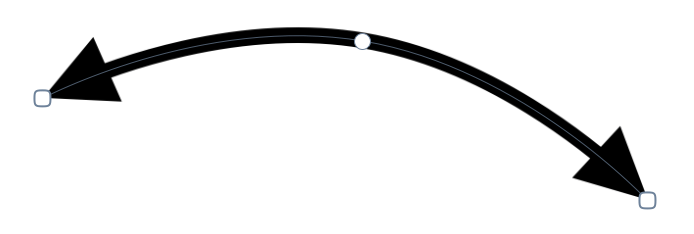
SVG importing has been much improved. Drop shadows, text on a path, poly lines, transforms, reading css colors, and more are all now supported. If you find a SVG that Acorn won’t open - let me know!
The multi-stop gradient filters now have an option to use the Oklab color space for blending interpolation. What that means is the blending between colors is a whole lot nicer (aka, “perceptual”):
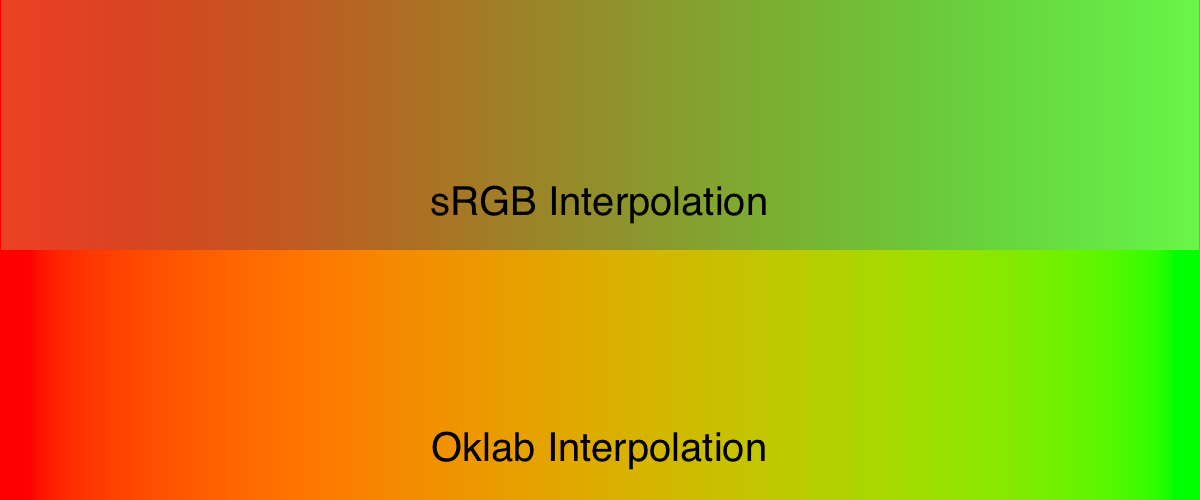
The Oklab interpolation isn’t available with gradients on vector shapes yet, but it’s something I’m working on.
Also new: pressing the option-tab keys will hide all palettes and toolbars. It’s a little thing, but I really like being able to see my image without any distractions. And if you have the “Edge to edge” canvas preference set, it’s great being able to see everything your image just floating there in space, “Letting the content shine” as Apple might say.
Various UI refinements with Liquid Glass and palette things when the canvas is set to edge to edge. There’s more to do here in the future as a general consensus begins to emerge for what Mac apps should look like on Tahoe, so expect more refinement in the future.
As a side note, as of today about 74% of you are using Acorn on Tahoe, 24% on Sequoia, and about 2% on Sonoma.
There’s more of course: and the full release notes are available as always.
What’s next? Well, I of course have a long list of things, but if you want to see something specific in Acorn, drop me a note.
512 Pixels: Mac OS X Shipped 25 Years Ago.
I still remember using the public betas, and Mac OS Server before that. Display Postscript is the thing that sticks out as being the most amazing to me at the time. And then Mac OS X brought Display PDF, which was a great step beyond that as well.
Happy Birthday, Mac OS X.
March 16, 2026
There’s been a lot of talk recently about Liquid Glass on MacOS, and it being an abomination (epic rant from Nilay Patel there). OK, it’s not recent, but there’s still a lot of talk and Nilay’s rant got me thinking:
If Apple was to move away from Liquid Glass on MacOS, how would they do it?
As I was futzing around with Acorn’s plist I realized that maybe the answer might already there. Mac apps that haven’t been linking against the newest SDKs or have the UIDesignRequiresCompatibility plist flag set to true get the MacOS Sequoia look and feel. What if that setting was system wide? What if there was an Appearance toggle that said something along the lines of “Use the pro look and feel”, and all apps got a variant of the Sequoia UI, but spiffed up a bit more? It’s Gizmo vs. Platinum all over again.
It wouldn’t solve all the problems people are encountering, but it would be an interesting place to start.
CasNum (Compass and straightedge Number) is a library that implements arbitrary precision arithmetic using compass and straightedge constructions. Arbitrary precision arithmetic, now with 100% more Euclid. Featuring a functional modified Game Boy emulator where every ALU opcode is implemented entirely through geometric constructions.
I’m sorry, what?
This project began with a simple compass-and-straightedge 'engine', […]. In compass-and-straightedge constructions, one start with just two points: The origin, and a unit. Exactly as God intended.
Still what?!
#Philosophy
Most modern developers are content with a + b. They don't want to work for it. They don't want to see the midpoint being birthed from the intersection of two circles. CasNum is for the developer who believes that if you didn't have to solve a 4th-degree polynomial just to increment a loop counter, you didn't really increment it.
This is pretty amazing, and just what I needed to see today. The FAQ is great too. Actually, the whole README is great.
If you don’t know what’s going on, you can watch the following YouTube video: The Simplest Ancient Math Problem No One Could Solve. I learned a bunch, but I probably only understood a quarter of what was being said.
Note: I’ve tried running CasNum on my Mac, but got a bunch of Python errors when trying to bring up the UI. I suspect this is only for Windows. The little movie on the project page shows it in action however, sped up quite a bit.
Via hn.
In episode 680 of ATP, at about 6:12 in, Marco Arment goes off on watchOS 26’s fitness app and trashes all the changes. And I couldn’t agree more with him.
I thought it was just me who hated all the changes, and the slow animations, and the workout picker. It’s such a regression I don’t even know where to start. Arment is considering getting a Garmin watch to replace his Apple Watch, and while I’m not that far along in my hate for it - I’m not too far behind. The only thing that’s keeping me using it is the history I have with it.
How much do I use the fitness app? 2-3 times daily. MWF: climbing, PT exercises; TTF: group gym workout; SMTWTFS: 2 mile walk with the dog (usualy); random other times: hikes or snowboarding or weekend climbing.
If I could downgrade my watch safely, I would.